If you’ve ever asked yourself, “Why is my Quality Score low?” — you’re not alone. It’s one of the most common frustrations we hear from business owners who are pouring money into Google Ads but not getting the results they expected.
A low Quality Score is more than just a number — it’s costing you money every single day. It drives up your cost per click (CPC), pushes your ads lower in the search results, and makes it harder to compete with businesses that may actually be spending less than you.
In this guide, you’ll learn exactly what Quality Score is, why it matters for your bottom line, and — most importantly — the specific steps you can take today to fix it.
Free Google Ads Audit
Want Me to Review Your Account?
I will check your campaigns, tracking setup, and show you exactly where the opportunities are — completely free.
What Is Quality Score in Google Ads?
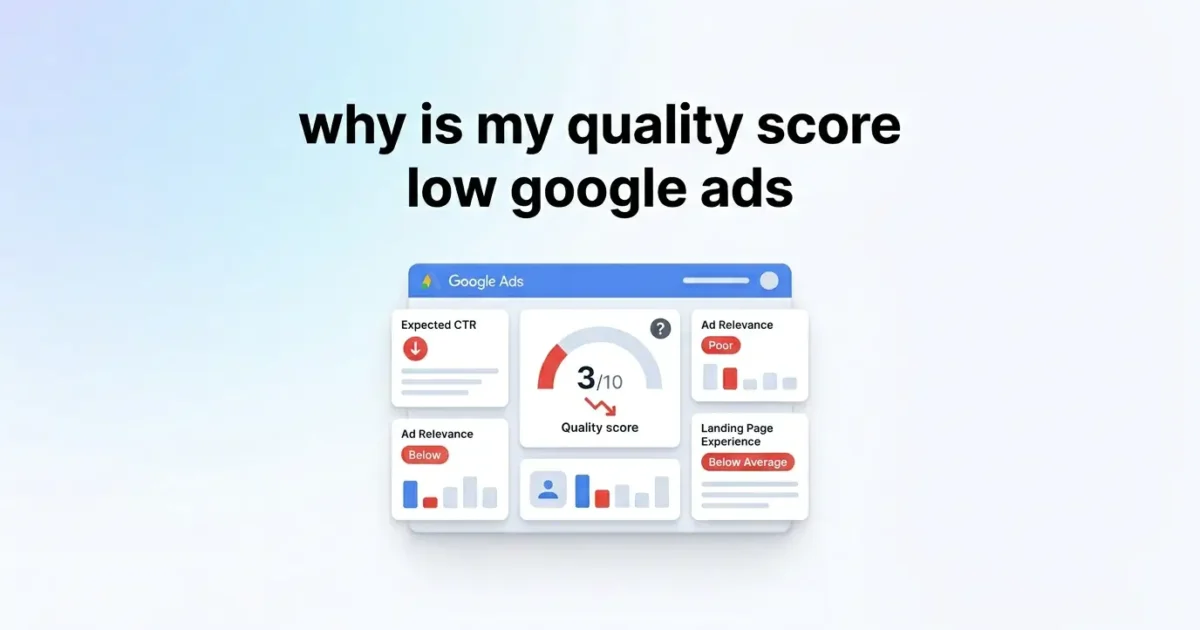
Quality Score is a rating Google gives each of your keywords on a scale of 1 to 10. Think of it as Google’s way of measuring how relevant and useful your ad experience is for someone searching for that keyword.
It’s made up of three components:
- Expected Click-Through Rate (CTR) — How likely is someone to click your ad when it appears?
- Ad Relevance — How closely does your ad copy match the intent behind the keyword?
- Landing Page Experience — Is your landing page helpful, fast, and relevant to what the user searched for?
Each component is rated as “Above Average,” “Average,” or “Below Average.” If any of those three areas are weak, your overall Quality Score will suffer.
Why Does a Low Quality Score Matter?
Here’s the short version: a low Quality Score makes your ads more expensive and less visible. Google’s ad auction isn’t just about who bids the most — it’s about who offers the best experience for the user.
Your Ad Rank — the formula that determines where your ad appears — is calculated using your bid multiplied by your Quality Score. So a competitor with a lower bid but a higher Quality Score can outrank you and pay less per click.
In our experience auditing hundreds of Google Ads accounts, we consistently find that businesses with Quality Scores of 3 or below are paying 30–50% more per click than they need to — without even realising it.
The impact cascades across your entire campaign: higher CPCs, lower ad positions, reduced impressions, and ultimately a worse return on ad spend (ROAS).
Why Is My Quality Score Low? Step-by-Step Fixes
Let’s get into the actual fixes. Work through each area below — addressing even two or three of these can dramatically improve your keyword Quality Scores.
Step 1: Tighten Up Your Ad Groups
One of the most common causes of a low Quality Score is having too many loosely related keywords in one ad group. When your ad group tries to cover too much ground, your ads can’t be relevant to all the keywords — and relevance is everything.
The fix: Create tightly themed ad groups — ideally Single Keyword Ad Groups (SKAGs) or small clusters of 3–5 very similar keywords. Each ad group should have its own ad copy written specifically for that theme.
Example: Don’t mix “emergency plumber” and “boiler repair” in the same ad group. Separate them so each ad speaks directly to the user’s intent.
Step 2: Rewrite Your Ad Copy for Relevance
Ad relevance is often the lowest-rated component we see in underperforming accounts. If your ad copy doesn’t closely mirror the keyword and the user’s intent, Google will rate it poorly.
Include your target keyword in the ad headline — ideally in Headline 1. Use dynamic keyword insertion (DKI) carefully if you have multiple keywords per ad group. Write benefit-focused copy that directly addresses what the user is searching for.
Run at least 3 ad variations per ad group and let Google’s responsive search ads (RSAs) find the best-performing combinations over time.
Step 3: Fix Your Landing Page Experience
Your landing page experience is a critical Quality Score factor — and it’s the one that most business owners overlook. Google evaluates whether your page is fast, mobile-friendly, easy to navigate, and relevant to the ad and keyword.
Key things to check:
- Page load speed — use Google PageSpeed Insights to check. Aim for a score of 70+ on mobile.
- Keyword alignment — the main keyword should appear naturally in your page headline and body copy.
- Clear call to action — make it obvious what the user should do next (call, buy, book, enquire).
- Mobile optimisation — over 60% of Google searches happen on mobile. If your page isn’t mobile-friendly, you’re losing on multiple fronts.
Pro tip: Every ad group should ideally link to its own dedicated landing page — not your generic homepage. The more tailored the landing page, the higher your Quality Score will be.
Step 4: Improve Your Expected CTR
Expected CTR is Google’s prediction of how likely your ad is to get clicked. It’s based on your historical CTR for that keyword (adjusted for ad position). A below-average CTR signals that your ads aren’t compelling enough.
To improve it:
- Use numbers and specifics in headlines (e.g., “Save 40%” or “Same-Day Delivery”).
- Add ad extensions — sitelinks, callouts, structured snippets, and call extensions all improve visibility and CTR.
- Pause keywords with consistently low CTR and high impressions — they drag your average down.
- Use negative keywords to prevent your ads from showing for irrelevant searches that will never convert.
For a deeper dive on structuring your campaigns for maximum relevance, see our guide on Google Ads campaign structure best practices.
Step 5: Remove or Pause Underperforming Keywords
Not all keywords are worth saving. If a keyword has a Quality Score of 3 or below after consistent impressions, it may be dragging your whole account down. Pause it, fix the ad and landing page, and then re-enable it — or remove it permanently and find a better variation.
Focus your budget on keywords scoring 6 and above. These will consistently deliver cheaper clicks and better ad positions.
Common Mistakes That Keep Your Quality Score Low
Even with the best intentions, it’s easy to fall into habits that actively hurt your Quality Score. Here are the most common ones we see:
- Sending all traffic to your homepage. Your homepage is designed for everyone — a converting landing page is designed for one specific person with one specific intent. Use dedicated pages.
- Using broad match keywords without negative keywords. Broad match can generate thousands of irrelevant searches. Without a solid negative keyword list, you’re getting clicks that will never convert and destroying your CTR.
- Never testing new ad copy. Stale ads lead to declining CTR over time. Test new headlines regularly and retire what’s not working.
- Ignoring the Quality Score column in Google Ads. This data is right there in your interface — check it weekly and treat anything below 5 as a red flag.
- Setting it and forgetting it. Google Ads rewards active management. Campaigns that are reviewed and adjusted regularly consistently outperform those that are left to run on autopilot.
Final Thoughts
A low Quality Score isn’t something you have to live with. It’s fixable — and fixing it will lower your costs, improve your ad positions, and help you get more from every pound or dollar you spend on Google Ads.
To recap the key takeaways:
- Tighten your ad groups — keep keywords tightly themed.
- Write highly relevant ad copy that matches search intent.
- Optimise your landing pages for speed, mobile, and relevance.
- Improve CTR with compelling headlines, ad extensions, and negative keywords.
- Pause or remove keywords with persistently low Quality Scores.
The sooner you start making these changes, the sooner your campaigns will become more efficient and more profitable.